


Popconfirm
Displays a confirmation dialog in a floating panel near a target element.
First release: 1.0.0 Latest update: July 1, 2025 Current version: 1.0.0
Import
import { PlusPopconfirm } from '@plusui/react';import { PlusPopconfirmComponent } from '@plusui/angular';import { PlusPopconfirm } from '@plusui/vue';import PlusPopconfirm from '@plusui/svelte';<script src="https://cdn.jsdelivr.net/npm/@plusui/core"></script>Package
@plusui/react@plusui/angular@plusui/vue@plusui/svelte@plusui/coreDocs
Changelog
Popconfirm Changelog
Recent changes and updates for the popconfirm component
v1.0.0
Added Popconfirm for confirmation dialogs
- Confirmation before action
- Customizable messages
- Multiple status variants
- Accessibility support
The Popconfirm component displays a small overlay confirmation dialog next to a target element, requiring the user to confirm an action. It’s useful for actions like deleting items or submitting forms.
Anatomy
Section titled “Anatomy”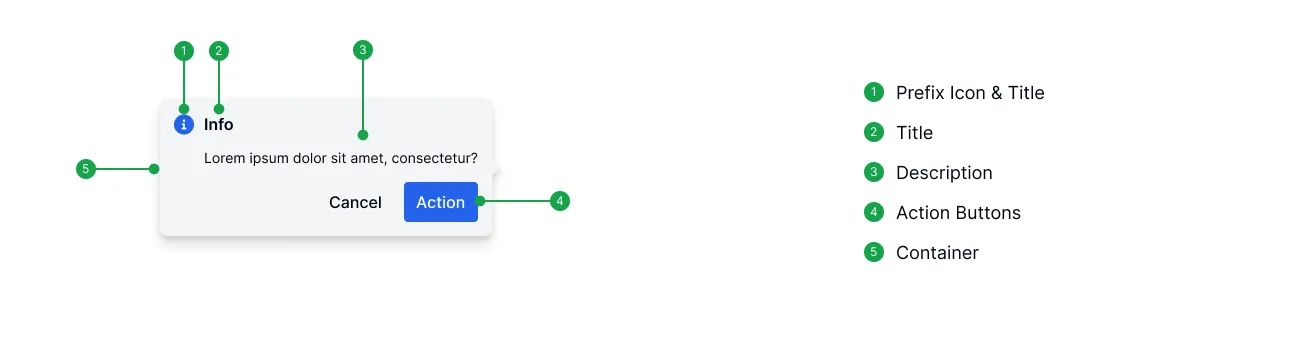
Basic Example
Section titled “Basic Example”A basic popconfirm triggered by clicking a button.
import { PlusPopconfirm, PlusButton } from '@plusui/react';
export default () => {  return (    <>      <PlusPopconfirm title="Delete Item?" confirmText="Yes, Delete" cancelText="No">        <div slot="content">          This action cannot be undone.        </div>        <PlusButton status="danger">          Delete        </PlusButton>      </PlusPopconfirm>    </>  );};
import { Component } from '@angular/core';
@Component({ selector: 'app-example', template: ` <plus-popconfirm title="Delete Item?" confirm-text="Yes, Delete" cancel-text="No"> <div slot="content"> This action cannot be undone. </div> <plus-button status="danger"> Delete </plus-button> </plus-popconfirm> `})export class ExampleComponent {}<template> <plus-popconfirm title="Delete Item?" confirm-text="Yes, Delete" cancel-text="No"> <div slot="content"> This action cannot be undone. </div> <plus-button status="danger"> Delete </plus-button> </plus-popconfirm></template><plus-popconfirm title="Delete Item?" confirm-text="Yes, Delete" cancel-text="No"> <div slot="content"> This action cannot be undone. </div> <plus-button status="danger"> Delete </plus-button></plus-popconfirm><plus-popconfirm title="Delete Item?" confirm-text="Yes, Delete" cancel-text="No"> <div slot="content"> This action cannot be undone. </div> <plus-button status="danger"> Delete </plus-button></plus-popconfirm>Orientation
Section titled “Orientation”Use the orientation prop to control where the popconfirm appears relative to the trigger element.
import { PlusPopconfirm, PlusButton } from '@plusui/react';
export default () => {  return (    <>      <div>        <PlusPopconfirm orientation="top-start" title="Position Top Start">          <PlusButton>            Top Start          </PlusButton>        </PlusPopconfirm>        <PlusPopconfirm orientation="top" title="Position Top">          <PlusButton>            Top          </PlusButton>        </PlusPopconfirm>        <PlusPopconfirm orientation="top-end" title="Position Top End">          <PlusButton>            Top End          </PlusButton>        </PlusPopconfirm>      </div>      <div className="flex gap-2">        <div className="flex flex-col gap-2">          <PlusPopconfirm orientation="left-start" title="Position Left Start">            <PlusButton>              Left Start            </PlusButton>          </PlusPopconfirm>          <PlusPopconfirm orientation="left" title="Position Left">            <PlusButton>              Left            </PlusButton>          </PlusPopconfirm>          <PlusPopconfirm orientation="left-end" title="Position Left End">            <PlusButton>              Left End            </PlusButton>          </PlusPopconfirm>        </div>        <div className="w-34">        </div>        <div className="flex flex-col gap-2 items-end">          <PlusPopconfirm orientation="right-start" title="Position Right Start">            <PlusButton>              Right Start            </PlusButton>          </PlusPopconfirm>          <PlusPopconfirm orientation="right" title="Position Right">            <PlusButton>              Right            </PlusButton>          </PlusPopconfirm>          <PlusPopconfirm orientation="right-end" title="Position Right End">            <PlusButton>              Right End            </PlusButton>          </PlusPopconfirm>        </div>      </div>      <div>        <PlusPopconfirm orientation="bottom-start" title="Position Bottom Start">          <PlusButton>            Bottom Start          </PlusButton>        </PlusPopconfirm>        <PlusPopconfirm orientation="bottom" title="Position Bottom">          <PlusButton>            Bottom          </PlusButton>        </PlusPopconfirm>        <PlusPopconfirm orientation="bottom-end" title="Position Bottom End">          <PlusButton>            Bottom End          </PlusButton>        </PlusPopconfirm>      </div>    </>  );};
import { Component } from '@angular/core';
@Component({ selector: 'app-example', template: ` <div> <plus-popconfirm orientation="top-start" title="Position Top Start"> <plus-button> Top Start </plus-button> </plus-popconfirm> <plus-popconfirm orientation="top" title="Position Top"> <plus-button> Top </plus-button> </plus-popconfirm> <plus-popconfirm orientation="top-end" title="Position Top End"> <plus-button> Top End </plus-button> </plus-popconfirm> </div> <div class="flex gap-2"> <div class="flex flex-col gap-2"> <plus-popconfirm orientation="left-start" title="Position Left Start"> <plus-button> Left Start </plus-button> </plus-popconfirm> <plus-popconfirm orientation="left" title="Position Left"> <plus-button> Left </plus-button> </plus-popconfirm> <plus-popconfirm orientation="left-end" title="Position Left End"> <plus-button> Left End </plus-button> </plus-popconfirm> </div> <div class="w-34"> </div> <div class="flex flex-col gap-2 items-end"> <plus-popconfirm orientation="right-start" title="Position Right Start"> <plus-button> Right Start </plus-button> </plus-popconfirm> <plus-popconfirm orientation="right" title="Position Right"> <plus-button> Right </plus-button> </plus-popconfirm> <plus-popconfirm orientation="right-end" title="Position Right End"> <plus-button> Right End </plus-button> </plus-popconfirm> </div> </div> <div> <plus-popconfirm orientation="bottom-start" title="Position Bottom Start"> <plus-button> Bottom Start </plus-button> </plus-popconfirm> <plus-popconfirm orientation="bottom" title="Position Bottom"> <plus-button> Bottom </plus-button> </plus-popconfirm> <plus-popconfirm orientation="bottom-end" title="Position Bottom End"> <plus-button> Bottom End </plus-button> </plus-popconfirm> </div> `})export class ExampleComponent {}<template> <div> <plus-popconfirm orientation="top-start" title="Position Top Start"> <plus-button> Top Start </plus-button> </plus-popconfirm> <plus-popconfirm orientation="top" title="Position Top"> <plus-button> Top </plus-button> </plus-popconfirm> <plus-popconfirm orientation="top-end" title="Position Top End"> <plus-button> Top End </plus-button> </plus-popconfirm> </div> <div class="flex gap-2"> <div class="flex flex-col gap-2"> <plus-popconfirm orientation="left-start" title="Position Left Start"> <plus-button> Left Start </plus-button> </plus-popconfirm> <plus-popconfirm orientation="left" title="Position Left"> <plus-button> Left </plus-button> </plus-popconfirm> <plus-popconfirm orientation="left-end" title="Position Left End"> <plus-button> Left End </plus-button> </plus-popconfirm> </div> <div class="w-34"> </div> <div class="flex flex-col gap-2 items-end"> <plus-popconfirm orientation="right-start" title="Position Right Start"> <plus-button> Right Start </plus-button> </plus-popconfirm> <plus-popconfirm orientation="right" title="Position Right"> <plus-button> Right </plus-button> </plus-popconfirm> <plus-popconfirm orientation="right-end" title="Position Right End"> <plus-button> Right End </plus-button> </plus-popconfirm> </div> </div> <div> <plus-popconfirm orientation="bottom-start" title="Position Bottom Start"> <plus-button> Bottom Start </plus-button> </plus-popconfirm> <plus-popconfirm orientation="bottom" title="Position Bottom"> <plus-button> Bottom </plus-button> </plus-popconfirm> <plus-popconfirm orientation="bottom-end" title="Position Bottom End"> <plus-button> Bottom End </plus-button> </plus-popconfirm> </div></template><div> <plus-popconfirm orientation="top-start" title="Position Top Start"> <plus-button> Top Start </plus-button> </plus-popconfirm> <plus-popconfirm orientation="top" title="Position Top"> <plus-button> Top </plus-button> </plus-popconfirm> <plus-popconfirm orientation="top-end" title="Position Top End"> <plus-button> Top End </plus-button> </plus-popconfirm></div><div class="flex gap-2"> <div class="flex flex-col gap-2"> <plus-popconfirm orientation="left-start" title="Position Left Start"> <plus-button> Left Start </plus-button> </plus-popconfirm> <plus-popconfirm orientation="left" title="Position Left"> <plus-button> Left </plus-button> </plus-popconfirm> <plus-popconfirm orientation="left-end" title="Position Left End"> <plus-button> Left End </plus-button> </plus-popconfirm> </div> <div class="w-34"> </div> <div class="flex flex-col gap-2 items-end"> <plus-popconfirm orientation="right-start" title="Position Right Start"> <plus-button> Right Start </plus-button> </plus-popconfirm> <plus-popconfirm orientation="right" title="Position Right"> <plus-button> Right </plus-button> </plus-popconfirm> <plus-popconfirm orientation="right-end" title="Position Right End"> <plus-button> Right End </plus-button> </plus-popconfirm> </div></div><div> <plus-popconfirm orientation="bottom-start" title="Position Bottom Start"> <plus-button> Bottom Start </plus-button> </plus-popconfirm> <plus-popconfirm orientation="bottom" title="Position Bottom"> <plus-button> Bottom </plus-button> </plus-popconfirm> <plus-popconfirm orientation="bottom-end" title="Position Bottom End"> <plus-button> Bottom End </plus-button> </plus-popconfirm></div><div> <plus-popconfirm orientation="top-start" title="Position Top Start"> <plus-button> Top Start </plus-button> </plus-popconfirm> <plus-popconfirm orientation="top" title="Position Top"> <plus-button> Top </plus-button> </plus-popconfirm> <plus-popconfirm orientation="top-end" title="Position Top End"> <plus-button> Top End </plus-button> </plus-popconfirm></div><div class="flex gap-2"> <div class="flex flex-col gap-2"> <plus-popconfirm orientation="left-start" title="Position Left Start"> <plus-button> Left Start </plus-button> </plus-popconfirm> <plus-popconfirm orientation="left" title="Position Left"> <plus-button> Left </plus-button> </plus-popconfirm> <plus-popconfirm orientation="left-end" title="Position Left End"> <plus-button> Left End </plus-button> </plus-popconfirm> </div> <div class="w-34"> </div> <div class="flex flex-col gap-2 items-end"> <plus-popconfirm orientation="right-start" title="Position Right Start"> <plus-button> Right Start </plus-button> </plus-popconfirm> <plus-popconfirm orientation="right" title="Position Right"> <plus-button> Right </plus-button> </plus-popconfirm> <plus-popconfirm orientation="right-end" title="Position Right End"> <plus-button> Right End </plus-button> </plus-popconfirm> </div></div><div> <plus-popconfirm orientation="bottom-start" title="Position Bottom Start"> <plus-button> Bottom Start </plus-button> </plus-popconfirm> <plus-popconfirm orientation="bottom" title="Position Bottom"> <plus-button> Bottom </plus-button> </plus-popconfirm> <plus-popconfirm orientation="bottom-end" title="Position Bottom End"> <plus-button> Bottom End </plus-button> </plus-popconfirm></div>Trigger
Section titled “Trigger”The trigger prop determines how the popconfirm is opened.
import { PlusPopconfirm, PlusButton } from '@plusui/react';
export default () => {  return (    <>      <PlusPopconfirm trigger="click" title="Trigger Click">        <PlusButton>          Click        </PlusButton>      </PlusPopconfirm>      <PlusPopconfirm trigger="hover" title="Trigger Hover">        <PlusButton>          Hover        </PlusButton>      </PlusPopconfirm>    </>  );};
import { Component } from '@angular/core';
@Component({ selector: 'app-example', template: ` <plus-popconfirm trigger="click" title="Trigger Click"> <plus-button> Click </plus-button> </plus-popconfirm> <plus-popconfirm trigger="hover" title="Trigger Hover"> <plus-button> Hover </plus-button> </plus-popconfirm> `})export class ExampleComponent {}<template> <plus-popconfirm trigger="click" title="Trigger Click"> <plus-button> Click </plus-button> </plus-popconfirm> <plus-popconfirm trigger="hover" title="Trigger Hover"> <plus-button> Hover </plus-button> </plus-popconfirm></template><plus-popconfirm trigger="click" title="Trigger Click"> <plus-button> Click </plus-button></plus-popconfirm><plus-popconfirm trigger="hover" title="Trigger Hover"> <plus-button> Hover </plus-button></plus-popconfirm><plus-popconfirm trigger="click" title="Trigger Click"> <plus-button> Click </plus-button></plus-popconfirm><plus-popconfirm trigger="hover" title="Trigger Hover"> <plus-button> Hover </plus-button></plus-popconfirm>Status
Section titled “Status”Use the status prop to apply different color schemes, often indicating the severity or type of action being confirmed.
import { PlusPopconfirm, PlusButton } from '@plusui/react';
export default () => {  return (    <>      <PlusPopconfirm status="default" title="Default">        <PlusButton>          Default        </PlusButton>      </PlusPopconfirm>      <PlusPopconfirm status="primary" title="Primary">        <PlusButton>          Primary        </PlusButton>      </PlusPopconfirm>      <PlusPopconfirm status="success" title="Success">        <PlusButton>          Success        </PlusButton>      </PlusPopconfirm>      <PlusPopconfirm status="warning" title="Warning">        <PlusButton>          Warning        </PlusButton>      </PlusPopconfirm>      <PlusPopconfirm status="danger" title="Danger">        <PlusButton>          Danger        </PlusButton>      </PlusPopconfirm>      <PlusPopconfirm status="info" title="Info">        <PlusButton>          Info        </PlusButton>      </PlusPopconfirm>    </>  );};
import { Component } from '@angular/core';
@Component({ selector: 'app-example', template: ` <plus-popconfirm status="default" title="Default"> <plus-button> Default </plus-button> </plus-popconfirm> <plus-popconfirm status="primary" title="Primary"> <plus-button> Primary </plus-button> </plus-popconfirm> <plus-popconfirm status="success" title="Success"> <plus-button> Success </plus-button> </plus-popconfirm> <plus-popconfirm status="warning" title="Warning"> <plus-button> Warning </plus-button> </plus-popconfirm> <plus-popconfirm status="danger" title="Danger"> <plus-button> Danger </plus-button> </plus-popconfirm> <plus-popconfirm status="info" title="Info"> <plus-button> Info </plus-button> </plus-popconfirm> `})export class ExampleComponent {}<template> <plus-popconfirm status="default" title="Default"> <plus-button> Default </plus-button> </plus-popconfirm> <plus-popconfirm status="primary" title="Primary"> <plus-button> Primary </plus-button> </plus-popconfirm> <plus-popconfirm status="success" title="Success"> <plus-button> Success </plus-button> </plus-popconfirm> <plus-popconfirm status="warning" title="Warning"> <plus-button> Warning </plus-button> </plus-popconfirm> <plus-popconfirm status="danger" title="Danger"> <plus-button> Danger </plus-button> </plus-popconfirm> <plus-popconfirm status="info" title="Info"> <plus-button> Info </plus-button> </plus-popconfirm></template><plus-popconfirm status="default" title="Default"> <plus-button> Default </plus-button></plus-popconfirm><plus-popconfirm status="primary" title="Primary"> <plus-button> Primary </plus-button></plus-popconfirm><plus-popconfirm status="success" title="Success"> <plus-button> Success </plus-button></plus-popconfirm><plus-popconfirm status="warning" title="Warning"> <plus-button> Warning </plus-button></plus-popconfirm><plus-popconfirm status="danger" title="Danger"> <plus-button> Danger </plus-button></plus-popconfirm><plus-popconfirm status="info" title="Info"> <plus-button> Info </plus-button></plus-popconfirm><plus-popconfirm status="default" title="Default"> <plus-button> Default </plus-button></plus-popconfirm><plus-popconfirm status="primary" title="Primary"> <plus-button> Primary </plus-button></plus-popconfirm><plus-popconfirm status="success" title="Success"> <plus-button> Success </plus-button></plus-popconfirm><plus-popconfirm status="warning" title="Warning"> <plus-button> Warning </plus-button></plus-popconfirm><plus-popconfirm status="danger" title="Danger"> <plus-button> Danger </plus-button></plus-popconfirm><plus-popconfirm status="info" title="Info"> <plus-button> Info </plus-button></plus-popconfirm>Custom Content and Title
Section titled “Custom Content and Title”Use slots title and content for more complex content than simple strings.
This is custom content with HTML.
import { PlusPopconfirm, PlusButton } from '@plusui/react';
export default () => {  return (    <>      <PlusPopconfirm confirmText="OK" cancelText="Close">        <div slot="title" className="flex items-center gap-2">          <i className="fa-solid fa-triangle-exclamation" style="color: orange;">          </i>          <span>            Custom Title          </span>        </div>        <div slot="content">          <p>            This is            <strong>              custom            </strong>            content with            <em>              HTML            </em>            .          </p>        </div>        <PlusButton>          Show Custom        </PlusButton>      </PlusPopconfirm>    </>  );};
import { Component } from '@angular/core';
@Component({ selector: 'app-example', template: ` <plus-popconfirm confirm-text="OK" cancel-text="Close"> <div slot="title" class="flex items-center gap-2"> <i class="fa-solid fa-triangle-exclamation" style="color: orange;"> </i> <span> Custom Title </span> </div> <div slot="content"> <p> This is <strong> custom </strong> content with <em> HTML </em> . </p> </div> <plus-button> Show Custom </plus-button> </plus-popconfirm> `})export class ExampleComponent {}<template> <plus-popconfirm confirm-text="OK" cancel-text="Close"> <div slot="title" class="flex items-center gap-2"> <i class="fa-solid fa-triangle-exclamation" style="color: orange;"> </i> <span> Custom Title </span> </div> <div slot="content"> <p> This is <strong> custom </strong> content with <em> HTML </em> . </p> </div> <plus-button> Show Custom </plus-button> </plus-popconfirm></template><plus-popconfirm confirm-text="OK" cancel-text="Close"> <div slot="title" class="flex items-center gap-2"> <i class="fa-solid fa-triangle-exclamation" style="color: orange;"> </i> <span> Custom Title </span> </div> <div slot="content"> <p> This is <strong> custom </strong> content with <em> HTML </em> . </p> </div> <plus-button> Show Custom </plus-button></plus-popconfirm><plus-popconfirm confirm-text="OK" cancel-text="Close"> <div slot="title" class="flex items-center gap-2"> <i class="fa-solid fa-triangle-exclamation" style="color: orange;"> </i> <span> Custom Title </span> </div> <div slot="content"> <p> This is <strong> custom </strong> content with <em> HTML </em> . </p> </div> <plus-button> Show Custom </plus-button></plus-popconfirm>Visual Sections
Section titled “Visual Sections”Layout & Spacing
Section titled “Layout & Spacing”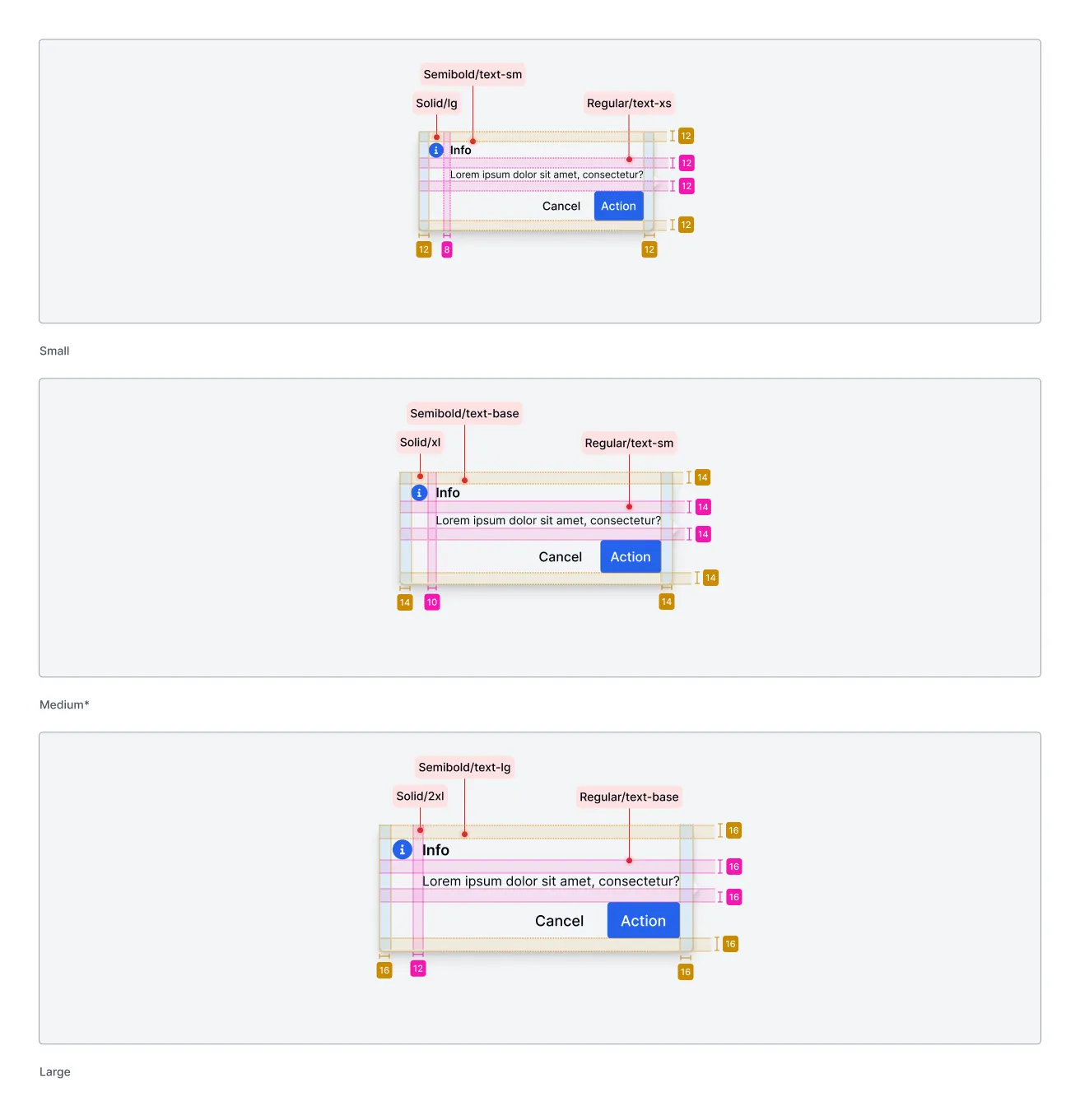
Light & Dark Mode
Section titled “Light & Dark Mode”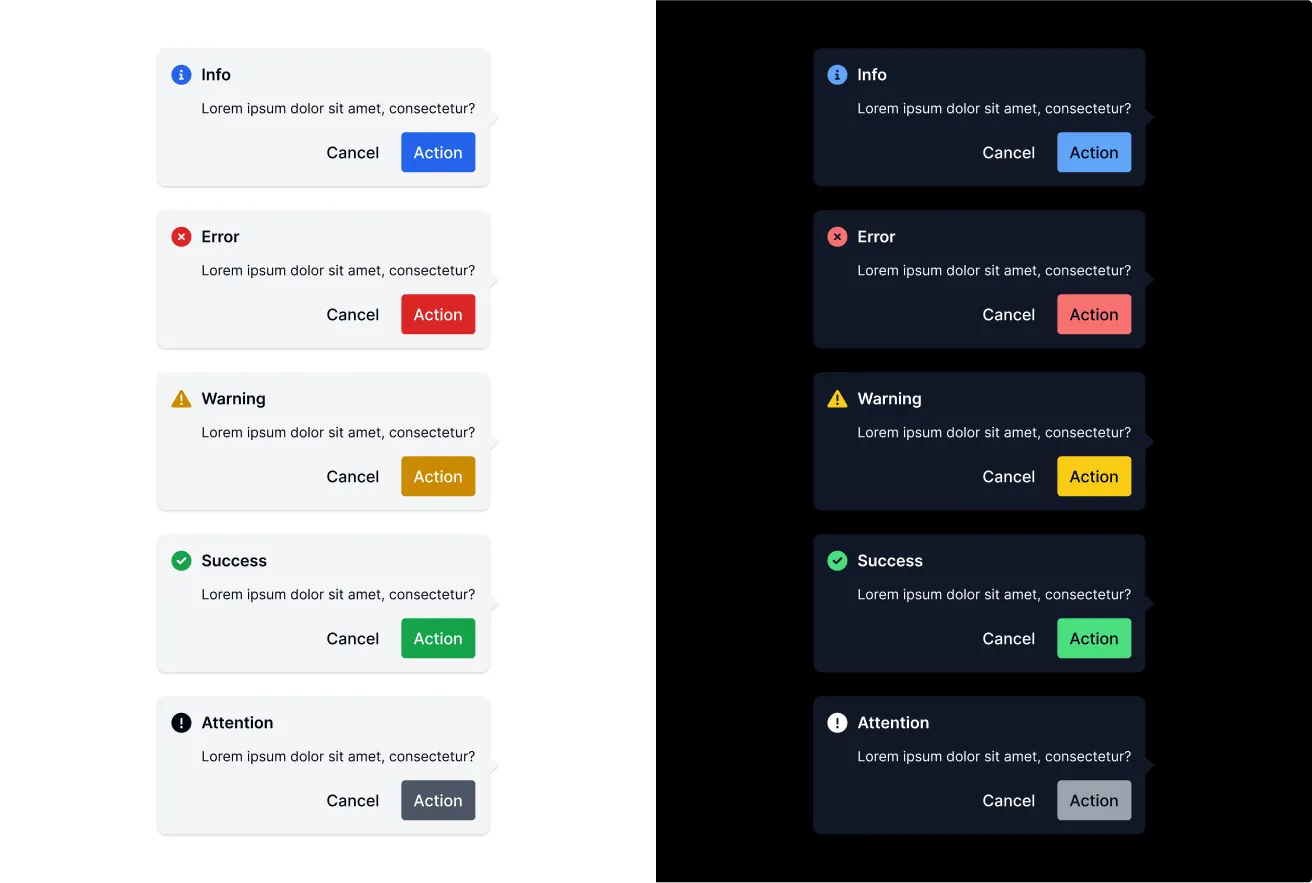
Accessibility (a11y)
Section titled “Accessibility (a11y)”- Keyboard Behavior:
- When the popconfirm is opened, focus is typically moved inside the dialog, usually to the first focusable element (like the Cancel or Confirm button).
TabandShift+Tabnavigate between focusable elements within the popconfirm (title, content if focusable, Cancel button, Confirm button, Close button if present). Focus is trapped within the dialog.Escapecloses the popconfirm and returns focus to the trigger element.EnterorSpaceactivates the focused button (Confirm, Cancel, Close).
- Screen Reader:
- The component uses
role="dialog",aria-modal="true",aria-labelledby(pointing to the title element), andaria-describedby(pointing to the content element). - When opened, screen readers announce the dialog’s role, title, and description.
- Buttons (Confirm, Cancel, Close) have accessible names derived from their text content or
aria-labelif using custom slots.
- The component uses
- Required Developer Actions:
- Ensure the trigger element (in the default slot) is inherently focusable or has
tabindex="0". - Provide clear and concise text for the
titleprop ortitleslot. - Provide descriptive content in the
contentslot. - If using custom content in
titleorcontentslots, ensure it’s accessible. - Use appropriate
statusvalues to convey semantic meaning.
- Ensure the trigger element (in the default slot) is inherently focusable or has
API Reference
Section titled “API Reference”| Name | Type | Default | Description | Required |
|---|---|---|---|---|
size | 'sm' | 'md' | 'lg' | 'md' | Size of the popconfirm dialog. | No |
orientation | 'top' | 'top-start' | 'top-end' | 'bottom' | 'bottom-start' | 'bottom-end' | 'left' | 'left-start' | 'left-end' | 'right' | 'right-start' | 'right-end' | 'top' | Position relative to the trigger element. | No |
trigger | 'click' | 'hover' | 'click' | How the popconfirm is opened. | No |
title | string | 'Are you sure?' | Title text displayed in the header. Use title slot for custom HTML. | No |
confirmText | string | 'Confirm' | Text for the confirm button. | No |
cancelText | string | 'Cancel' | Text for the cancel button. | No |
status | 'success' | 'warning' | 'danger' | 'info' | 'primary' | 'default' | 'default' | Color scheme and default icon based on status. | No |
statusIcon | boolean | true | Whether to show the default status icon. | No |
showArrow | boolean | true | Whether to display the arrow pointing to the trigger element. | No |
Events
Section titled “Events”| Name | Payload Type | Description |
|---|---|---|
plus-popconfirm-open | CustomEvent<void> | Fired when the popconfirm opens. |
plus-popconfirm-close | CustomEvent<void> | Fired when the popconfirm closes. |
plus-popconfirm-confirm | CustomEvent<void> | Fired when the confirm button is clicked. |
plus-popconfirm-cancel | CustomEvent<void> | Fired when the cancel button is clicked. |
| Name | Description |
|---|---|
default (unnamed) | The target element that triggers the popconfirm. |
icon | Custom icon content, replaces the default status icon. |
title | Custom title content, overrides the title prop. |
header | Custom header content, replaces the entire default header section. |
footer | Custom footer content, replaces the entire default footer section. |
content | The main descriptive content inside the popconfirm body. |
CSS Shadow Parts
Section titled “CSS Shadow Parts”| Part | Description |
|---|---|
popconfirm | The main popconfirm container element. |
arrow | The arrow element pointing to the trigger. |
header | The header section container. |
title | The title element container. |
content | The main content area container. |
footer | The footer section container. |
Join the Community
Plus UI is built by the community. Join us on our platforms to contribute, get help, and stay up to date.