


Chip
Represents tags, categories, attributes, or simple selections in a compact format.
First release: 1.0.0 Latest update: July 1, 2025 Current version: 1.0.0
Import
import { PlusChip } from '@plusui/react';import { PlusChipComponent } from '@plusui/angular';import { PlusChip } from '@plusui/vue';import PlusChip from '@plusui/svelte';<script src="https://cdn.jsdelivr.net/npm/@plusui/core"></script>Package
@plusui/react@plusui/angular@plusui/vue@plusui/svelte@plusui/coreDocs
Changelog
Chip Changelog
Recent changes and updates for the chip component
v1.0.0
Added Chip component for tags and labels
- Multiple status variants
- Dismissible chips
- Custom icons
- Accessibility support
The Chip component displays information such as tags, categories, attributes, or selections in a compact and optionally interactive format. It supports various styles, sizes, and statuses.
Anatomy
Section titled “Anatomy”
Basic Example
Section titled “Basic Example”A standard chip using default settings.
import { PlusChip } from '@plusui/react';
export default () => {  return (    <>      <PlusChip>        Default Chip      </PlusChip>    </>  );};
import { Component } from '@angular/core';
@Component({ selector: 'app-example', template: ` <plus-chip> Default Chip </plus-chip> `})export class ExampleComponent {}<template> <plus-chip> Default Chip </plus-chip></template><plus-chip> Default Chip</plus-chip><plus-chip> Default Chip</plus-chip>The kind prop defines the chip’s visual style: filled (solid background) or outlined (transparent with border).
import { PlusChip } from '@plusui/react';
export default () => {  return (    <>      <PlusChip kind="filled">        Kind      </PlusChip>      <PlusChip kind="outlined">        Kind      </PlusChip>    </>  );};
import { Component } from '@angular/core';
@Component({ selector: 'app-example', template: ` <plus-chip kind="filled"> Kind </plus-chip> <plus-chip kind="outlined"> Kind </plus-chip> `})export class ExampleComponent {}<template> <plus-chip kind="filled"> Kind </plus-chip> <plus-chip kind="outlined"> Kind </plus-chip></template><plus-chip kind="filled"> Kind</plus-chip><plus-chip kind="outlined"> Kind</plus-chip><plus-chip kind="filled"> Kind</plus-chip><plus-chip kind="outlined"> Kind</plus-chip>Status
Section titled “Status”The status prop sets the chip’s color scheme to convey semantic meaning.
import { PlusChip } from '@plusui/react';
export default () => {  return (    <>      <PlusChip status="default">        Status      </PlusChip>      <PlusChip status="info">        Status      </PlusChip>      <PlusChip status="success">        Status      </PlusChip>      <PlusChip status="warning">        Status      </PlusChip>      <PlusChip status="danger">        Status      </PlusChip>    </>  );};
import { Component } from '@angular/core';
@Component({ selector: 'app-example', template: ` <plus-chip status="default"> Status </plus-chip> <plus-chip status="info"> Status </plus-chip> <plus-chip status="success"> Status </plus-chip> <plus-chip status="warning"> Status </plus-chip> <plus-chip status="danger"> Status </plus-chip> `})export class ExampleComponent {}<template> <plus-chip status="default"> Status </plus-chip> <plus-chip status="info"> Status </plus-chip> <plus-chip status="success"> Status </plus-chip> <plus-chip status="warning"> Status </plus-chip> <plus-chip status="danger"> Status </plus-chip></template><plus-chip status="default"> Status</plus-chip><plus-chip status="info"> Status</plus-chip><plus-chip status="success"> Status</plus-chip><plus-chip status="warning"> Status</plus-chip><plus-chip status="danger"> Status</plus-chip><plus-chip status="default"> Status</plus-chip><plus-chip status="info"> Status</plus-chip><plus-chip status="success"> Status</plus-chip><plus-chip status="warning"> Status</plus-chip><plus-chip status="danger"> Status</plus-chip>The size prop controls the chip’s dimensions.
import { PlusChip } from '@plusui/react';
export default () => {  return (    <>      <PlusChip size="sm">        Size      </PlusChip>      <PlusChip size="md">        Size      </PlusChip>      <PlusChip size="lg">        Size      </PlusChip>    </>  );};
import { Component } from '@angular/core';
@Component({ selector: 'app-example', template: ` <plus-chip size="sm"> Size </plus-chip> <plus-chip size="md"> Size </plus-chip> <plus-chip size="lg"> Size </plus-chip> `})export class ExampleComponent {}<template> <plus-chip size="sm"> Size </plus-chip> <plus-chip size="md"> Size </plus-chip> <plus-chip size="lg"> Size </plus-chip></template><plus-chip size="sm"> Size</plus-chip><plus-chip size="md"> Size</plus-chip><plus-chip size="lg"> Size</plus-chip><plus-chip size="sm"> Size</plus-chip><plus-chip size="md"> Size</plus-chip><plus-chip size="lg"> Size</plus-chip>The shape prop controls the border radius: full (pill shape) or rounded (slightly rounded corners).
import { PlusChip } from '@plusui/react';
export default () => {  return (    <>      <PlusChip shape="full">        Shape      </PlusChip>      <PlusChip shape="rounded">        Shape      </PlusChip>    </>  );};
import { Component } from '@angular/core';
@Component({ selector: 'app-example', template: ` <plus-chip shape="full"> Shape </plus-chip> <plus-chip shape="rounded"> Shape </plus-chip> `})export class ExampleComponent {}<template> <plus-chip shape="full"> Shape </plus-chip> <plus-chip shape="rounded"> Shape </plus-chip></template><plus-chip shape="full"> Shape</plus-chip><plus-chip shape="rounded"> Shape</plus-chip><plus-chip shape="full"> Shape</plus-chip><plus-chip shape="rounded"> Shape</plus-chip>Invert
Section titled “Invert”Set the invert prop to use an inverted color scheme, typically for display on darker backgrounds.
import { PlusChip } from '@plusui/react';
export default () => {  return (    <>      <PlusChip status="default" invert="true">        Inverted      </PlusChip>      <PlusChip status="info" invert="true">        Inverted      </PlusChip>      <PlusChip status="success" invert="true">        Inverted      </PlusChip>      <PlusChip status="warning" invert="true">        Inverted      </PlusChip>      <PlusChip status="danger" invert="true">        Inverted      </PlusChip>    </>  );};
import { Component } from '@angular/core';
@Component({ selector: 'app-example', template: ` <plus-chip status="default" invert="true"> Inverted </plus-chip> <plus-chip status="info" invert="true"> Inverted </plus-chip> <plus-chip status="success" invert="true"> Inverted </plus-chip> <plus-chip status="warning" invert="true"> Inverted </plus-chip> <plus-chip status="danger" invert="true"> Inverted </plus-chip> `})export class ExampleComponent {}<template> <plus-chip status="default" invert="true"> Inverted </plus-chip> <plus-chip status="info" invert="true"> Inverted </plus-chip> <plus-chip status="success" invert="true"> Inverted </plus-chip> <plus-chip status="warning" invert="true"> Inverted </plus-chip> <plus-chip status="danger" invert="true"> Inverted </plus-chip></template><plus-chip status="default" invert="true"> Inverted</plus-chip><plus-chip status="info" invert="true"> Inverted</plus-chip><plus-chip status="success" invert="true"> Inverted</plus-chip><plus-chip status="warning" invert="true"> Inverted</plus-chip><plus-chip status="danger" invert="true"> Inverted</plus-chip><plus-chip status="default" invert="true"> Inverted</plus-chip><plus-chip status="info" invert="true"> Inverted</plus-chip><plus-chip status="success" invert="true"> Inverted</plus-chip><plus-chip status="warning" invert="true"> Inverted</plus-chip><plus-chip status="danger" invert="true"> Inverted</plus-chip>Dismissible
Section titled “Dismissible”Set the dismiss prop to add a close button. Clicking it fires the dismiss event.
import { PlusChip } from '@plusui/react';
export default () => {  const handleDismiss = (event) => {    console.log('Chip dismissed!');    event.target.style.display = 'none'; // Example: hide the chip  };
  return (    <>      <PlusChip dismiss onDismiss={handleDismiss}>Dismissible</PlusChip>      <PlusChip dismiss kind="outlined" onDismiss={handleDismiss}>        Outlined Dismiss      </PlusChip>    </>  );};
import { Component } from '@angular/core';
@Component({ selector: 'app-chip-dismiss', template: ` <plus-chip dismiss (dismiss)="handleDismiss($event)">Dismissible</plus-chip> <plus-chip dismiss kind="outlined" (dismiss)="handleDismiss($event)"> Outlined Dismiss </plus-chip> `})export class ChipDismissComponent { handleDismiss(event: Event) { console.log('Chip dismissed!'); (event.target as HTMLElement).style.display = 'none'; // Example: hide the chip }}<template> <plus-chip dismiss @dismiss="handleDismiss">Dismissible</plus-chip> <plus-chip dismiss kind="outlined" @dismiss="handleDismiss"> Outlined Dismiss </plus-chip></template>
<script setup>const handleDismiss = (event) => { console.log('Chip dismissed!'); event.target.style.display = 'none'; // Example: hide the chip};</script><script> import { onMount } from 'svelte';
let chipElements = [];
onMount(() => { chipElements.forEach(chip => { if (chip) { chip.addEventListener('dismiss', () => { console.log('Chip dismissed!'); chip.style.display = 'none'; }); } }); });</script>
<plus-chip bind:this={chipElements[0]} dismiss>Dismissible</plus-chip><plus-chip bind:this={chipElements[1]} dismiss kind="outlined"> Outlined Dismiss</plus-chip><plus-chip dismiss id="dismissible-chip">Dismissible</plus-chip><plus-chip dismiss kind="outlined" id="outlined-dismiss-chip"> Outlined Dismiss</plus-chip>
<script> document.querySelectorAll('plus-chip[dismiss]').forEach(chip => { chip.addEventListener('dismiss', () => { console.log('Chip dismissed!'); chip.style.display = 'none'; // Example: hide the chip }); });</script>Disabled State
Section titled “Disabled State”Set the disabled prop to prevent user interaction, including dismissing.
import { PlusChip } from '@plusui/react';
export default () => {  return (    <>      <PlusChip disabled>        Disabled      </PlusChip>      <PlusChip kind="outlined" disabled>        Disabled Outlined      </PlusChip>      <PlusChip dismiss="true" disabled>        Disabled Dismissible      </PlusChip>    </>  );};
import { Component } from '@angular/core';
@Component({ selector: 'app-example', template: ` <plus-chip disabled> Disabled </plus-chip> <plus-chip kind="outlined" disabled> Disabled Outlined </plus-chip> <plus-chip dismiss="true" disabled> Disabled Dismissible </plus-chip> `})export class ExampleComponent {}<template> <plus-chip disabled> Disabled </plus-chip> <plus-chip kind="outlined" disabled> Disabled Outlined </plus-chip> <plus-chip dismiss="true" disabled> Disabled Dismissible </plus-chip></template><plus-chip disabled> Disabled</plus-chip><plus-chip kind="outlined" disabled> Disabled Outlined</plus-chip><plus-chip dismiss="true" disabled> Disabled Dismissible</plus-chip><plus-chip disabled> Disabled</plus-chip><plus-chip kind="outlined" disabled> Disabled Outlined</plus-chip><plus-chip dismiss="true" disabled> Disabled Dismissible</plus-chip>Visual Sections
Section titled “Visual Sections”Layout & Spacing
Section titled “Layout & Spacing”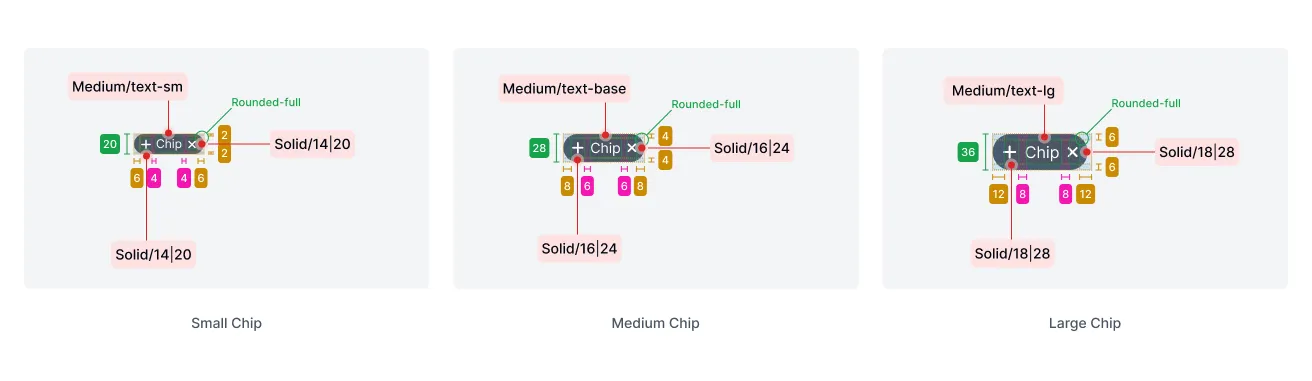
Light & Dark Mode
Section titled “Light & Dark Mode”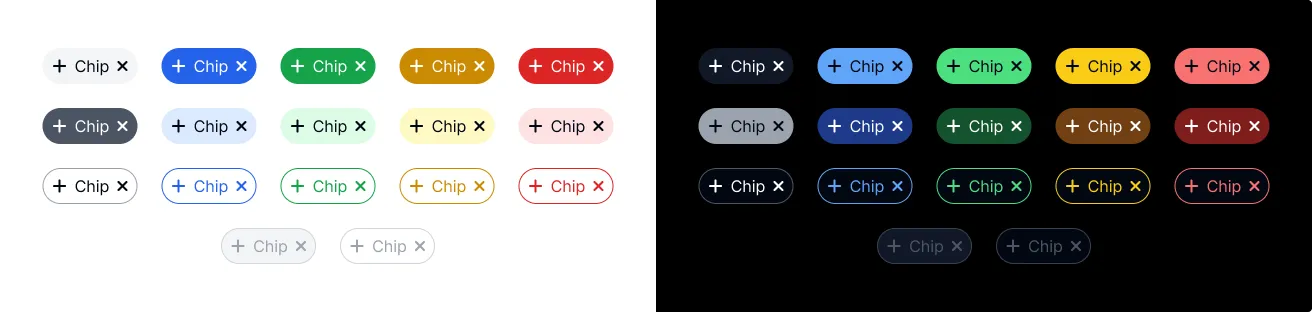
Accessibility (a11y)
Section titled “Accessibility (a11y)”- Keyboard Behavior:
- Chips are focusable via the
Tabkey if not disabled. - If a chip is
dismissible, the dismiss button (plus-icon) is focusable and can be activated withEnterorSpace.
- Chips are focusable via the
- Screen Reader:
- The component has
role="status"andaria-live="polite". aria-labelis set based on thestatusprop (e.g., “success chip”). Consider providing more specific context if needed, potentially via anaria-labelledbyattribute pointing to associated text.aria-disabledis set based on thedisabledprop.- The dismiss button has an
aria-label="Remove".
- The component has
- Required Developer Actions:
- Ensure the chip’s content (passed via the default slot) is meaningful and understandable.
- If chips represent interactive elements (like filters), consider using a more appropriate role (e.g.,
buttonorcheckbox) depending on the interaction model, potentially by wrapping theplus-chipor using a different component. - Ensure sufficient color contrast between the chip’s text/icon and its background, especially when using
statuscolors or customizing with CSS properties.
Design System
Section titled “Design System”API Reference
Section titled “API Reference”Properties
Section titled “Properties”| Name | Type | Default | Description | Required |
|---|---|---|---|---|
kind | 'filled' | 'outlined' | 'filled' | Visual style of the chip. | No |
size | 'sm' | 'md' | 'lg' | 'md' | Size of the chip. | No |
type | 'default' | 'avatar' | 'default' | Type of chip, affecting potential internal layout (e.g., for avatar). | No |
status | 'default' | 'success' | 'warning' | 'danger' | 'info' | 'default' | Status/color variant of the chip. | No |
shape | 'full' | 'rounded' | 'full' | Controls the border radius style. | No |
invert | boolean | false | Toggles the inverted color scheme. | No |
dismiss | boolean | false | Shows a dismiss button. | No |
disabled | boolean | false | Disables chip interaction, including the dismiss button. | No |
Events
Section titled “Events”| Name | Payload Type | Description |
|---|---|---|
dismiss | CustomEvent<void> | Fired when the dismiss button is clicked. |
| Name | Description |
|---|---|
default (unnamed) | The main content of the chip. |
CSS Shadow Parts
Section titled “CSS Shadow Parts”| Part | Description |
|---|---|
base | The main chip container element (div). |
icon | The dismiss icon container (plus-icon). |
CSS Custom Properties
Section titled “CSS Custom Properties”| Name | Description |
|---|---|
--text-color | Controls the text color. |
--border-color | Controls the border color. |
--bg-default | Controls the default background color. |
--bg-hovered | Controls the background on hover. |
--bg-pressed | Controls the background when pressed. |
--bg-focused | Controls the background when focused. |
Join the Community
Plus UI is built by the community. Join us on our platforms to contribute, get help, and stay up to date.