


Alert
Displays important messages or notifications to users in a prominent way.
First release: 1.0.0 Latest update: July 1, 2025 Current version: 1.0.0
Import
import { PlusAlert } from '@plusui/react';import { PlusAlertComponent } from '@plusui/angular';import { PlusAlert } from '@plusui/vue';import PlusAlert from '@plusui/svelte';<script src="https://cdn.jsdelivr.net/npm/@plusui/core"></script>Package
@plusui/react@plusui/angular@plusui/vue@plusui/svelte@plusui/coreDocs
Changelog
Alert Changelog
Recent changes and updates for the alert component
v1.0.0
Added Alert component for user feedback
- 5 status variants: default, success, warning, danger, info
- Dismissible alerts
- Custom icons and messages
- Accessibility with ARIA attributes
The Alert component is used to convey important information to users, such as success messages, warnings, errors, or general information. It typically includes a status icon, a message, an optional description, and a dismiss button.
Anatomy
Section titled “Anatomy”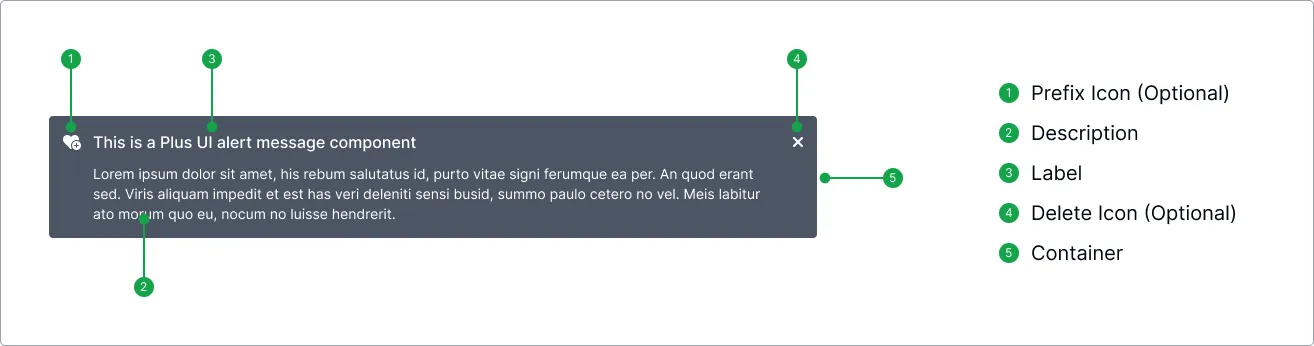
Basic Example
Section titled “Basic Example”A basic alert displays a message with a default status icon.
import { PlusAlert } from '@plusui/react';
export default () => {  return (    <>      <PlusAlert status="info">        <div slot="message">          This is an informational alert.        </div>      </PlusAlert>    </>  );};
import { Component } from '@angular/core';
@Component({ selector: 'app-example', template: ` <plus-alert status="info"> <div slot="message"> This is an informational alert. </div> </plus-alert> `})export class ExampleComponent {}<template> <plus-alert status="info"> <div slot="message"> This is an informational alert. </div> </plus-alert></template><plus-alert status="info"> <div slot="message"> This is an informational alert. </div></plus-alert><plus-alert status="info"> <div slot="message"> This is an informational alert. </div></plus-alert>Status
Section titled “Status”Use the status prop to indicate the type of message: info (default), success, warning, or danger. This affects the color scheme and the default icon.
import { PlusAlert } from '@plusui/react';
export default () => {  return (    <>      <PlusAlert status="success">        <div slot="message">          Operation successful!        </div>      </PlusAlert>      <PlusAlert status="warning">        <div slot="message">          Operation successful!        </div>      </PlusAlert>      <PlusAlert status="danger">        <div slot="message">          Operation successful!        </div>      </PlusAlert>    </>  );};
import { Component } from '@angular/core';
@Component({ selector: 'app-example', template: ` <plus-alert status="success"> <div slot="message"> Operation successful! </div> </plus-alert> <plus-alert status="warning"> <div slot="message"> Operation successful! </div> </plus-alert> <plus-alert status="danger"> <div slot="message"> Operation successful! </div> </plus-alert> `})export class ExampleComponent {}<template> <plus-alert status="success"> <div slot="message"> Operation successful! </div> </plus-alert> <plus-alert status="warning"> <div slot="message"> Operation successful! </div> </plus-alert> <plus-alert status="danger"> <div slot="message"> Operation successful! </div> </plus-alert></template><plus-alert status="success"> <div slot="message"> Operation successful! </div></plus-alert><plus-alert status="warning"> <div slot="message"> Operation successful! </div></plus-alert><plus-alert status="danger"> <div slot="message"> Operation successful! </div></plus-alert><plus-alert status="success"> <div slot="message"> Operation successful! </div></plus-alert><plus-alert status="warning"> <div slot="message"> Operation successful! </div></plus-alert><plus-alert status="danger"> <div slot="message"> Operation successful! </div></plus-alert>The kind prop controls the visual appearance: filled (default), outlined, or dashed.
import { PlusAlert } from '@plusui/react';
export default () => {  return (    <>      <PlusAlert status="info" kind="filled">        <div slot="message">          Filled (Default)        </div>      </PlusAlert>      <PlusAlert status="info" kind="outlined">        <div slot="message">          Filled (Default)        </div>      </PlusAlert>      <PlusAlert status="info" kind="dashed">        <div slot="message">          Filled (Default)        </div>      </PlusAlert>    </>  );};
import { Component } from '@angular/core';
@Component({ selector: 'app-example', template: ` <plus-alert status="info" kind="filled"> <div slot="message"> Filled (Default) </div> </plus-alert> <plus-alert status="info" kind="outlined"> <div slot="message"> Filled (Default) </div> </plus-alert> <plus-alert status="info" kind="dashed"> <div slot="message"> Filled (Default) </div> </plus-alert> `})export class ExampleComponent {}<template> <plus-alert status="info" kind="filled"> <div slot="message"> Filled (Default) </div> </plus-alert> <plus-alert status="info" kind="outlined"> <div slot="message"> Filled (Default) </div> </plus-alert> <plus-alert status="info" kind="dashed"> <div slot="message"> Filled (Default) </div> </plus-alert></template><plus-alert status="info" kind="filled"> <div slot="message"> Filled (Default) </div></plus-alert><plus-alert status="info" kind="outlined"> <div slot="message"> Filled (Default) </div></plus-alert><plus-alert status="info" kind="dashed"> <div slot="message"> Filled (Default) </div></plus-alert><plus-alert status="info" kind="filled"> <div slot="message"> Filled (Default) </div></plus-alert><plus-alert status="info" kind="outlined"> <div slot="message"> Filled (Default) </div></plus-alert><plus-alert status="info" kind="dashed"> <div slot="message"> Filled (Default) </div></plus-alert>Closable
Section titled “Closable”Set the dismissible attribute (or dismissible={true}) to add a close button. The alert fires a plus-dismiss event when closed.
import { PlusAlert } from '@plusui/react';
export default () => {  const handleDismiss = () => {    console.log('Alert dismissed!');  };
  return (    <PlusAlert status="warning" dismissible onPlusDismiss={handleDismiss}>      <div slot="message">This alert can be closed.</div>      <div slot="description">Click the X button to dismiss.</div>    </PlusAlert>  );};
import { Component } from '@angular/core';
@Component({ selector: 'app-example', template: ` <plus-alert status="warning" dismissible (plus-dismiss)="handleDismiss()"> <div slot="message">This alert can be closed.</div> <div slot="description">Click the X button to dismiss.</div> </plus-alert> `})export class ExampleComponent { handleDismiss() { console.log('Alert dismissed!'); }}<template> <plus-alert status="warning" dismissible @plus-dismiss="handleDismiss"> <div slot="message">This alert can be closed.</div> <div slot="description">Click the X button to dismiss.</div> </plus-alert></template>
<script>export default { methods: { handleDismiss() { console.log('Alert dismissed!'); } }};</script><script> function handleDismiss() { console.log('Alert dismissed!'); }</script>
<plus-alert status="warning" dismissible on:plus-dismiss={handleDismiss}> <div slot="message">This alert can be closed.</div> <div slot="description">Click the X button to dismiss.</div></plus-alert><plus-alert id="alert-dismiss-example" status="warning" dismissible> <div slot="message">This alert can be closed.</div> <div slot="description">Click the X button to dismiss.</div></plus-alert>
<script> document.getElementById('alert-dismiss-example').addEventListener('plus-dismiss', () => { console.log('Alert dismissed!'); });</script>Visual Sections
Section titled “Visual Sections”Layout & Spacing
Section titled “Layout & Spacing”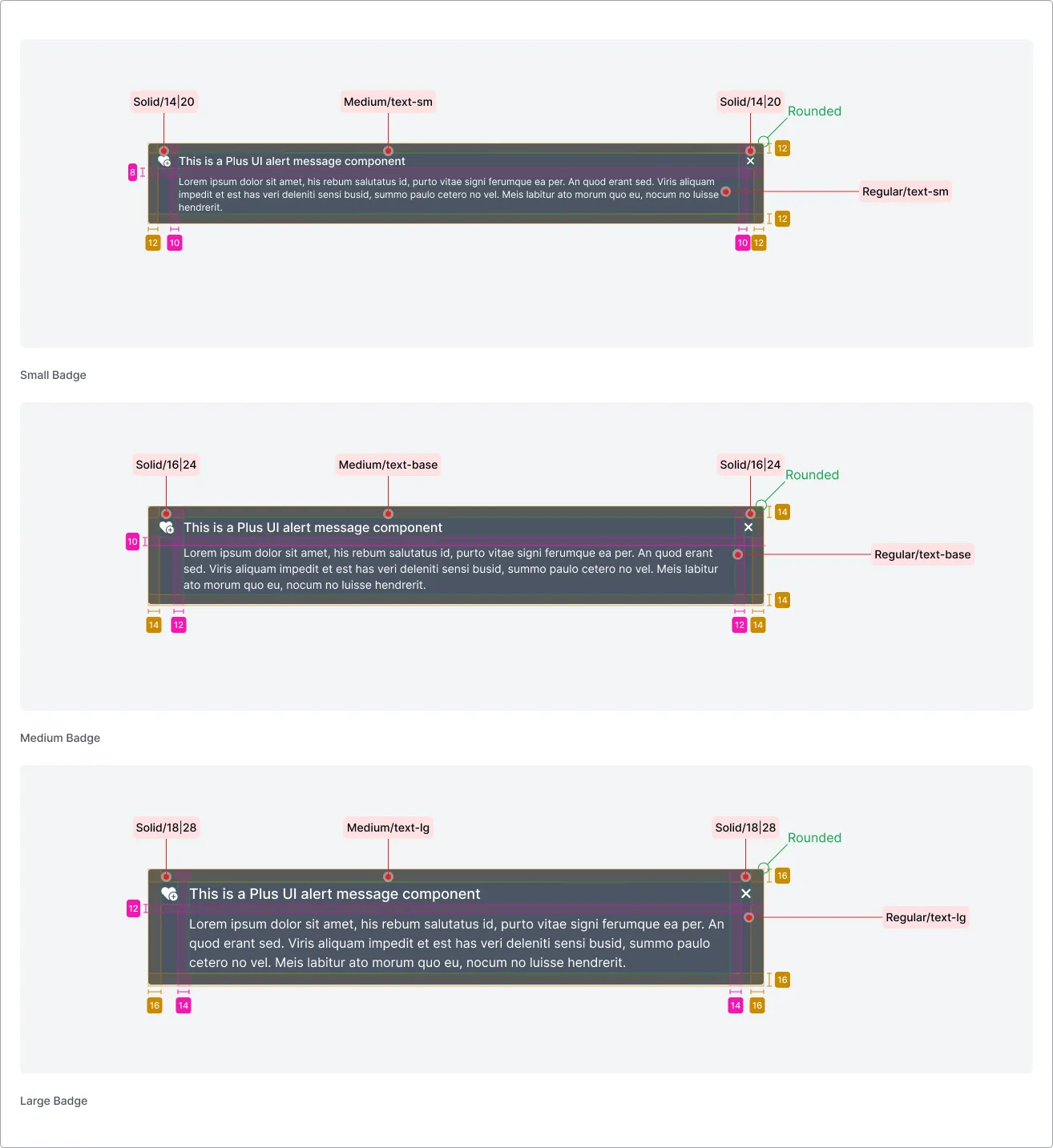
Light & Dark Mode
Section titled “Light & Dark Mode”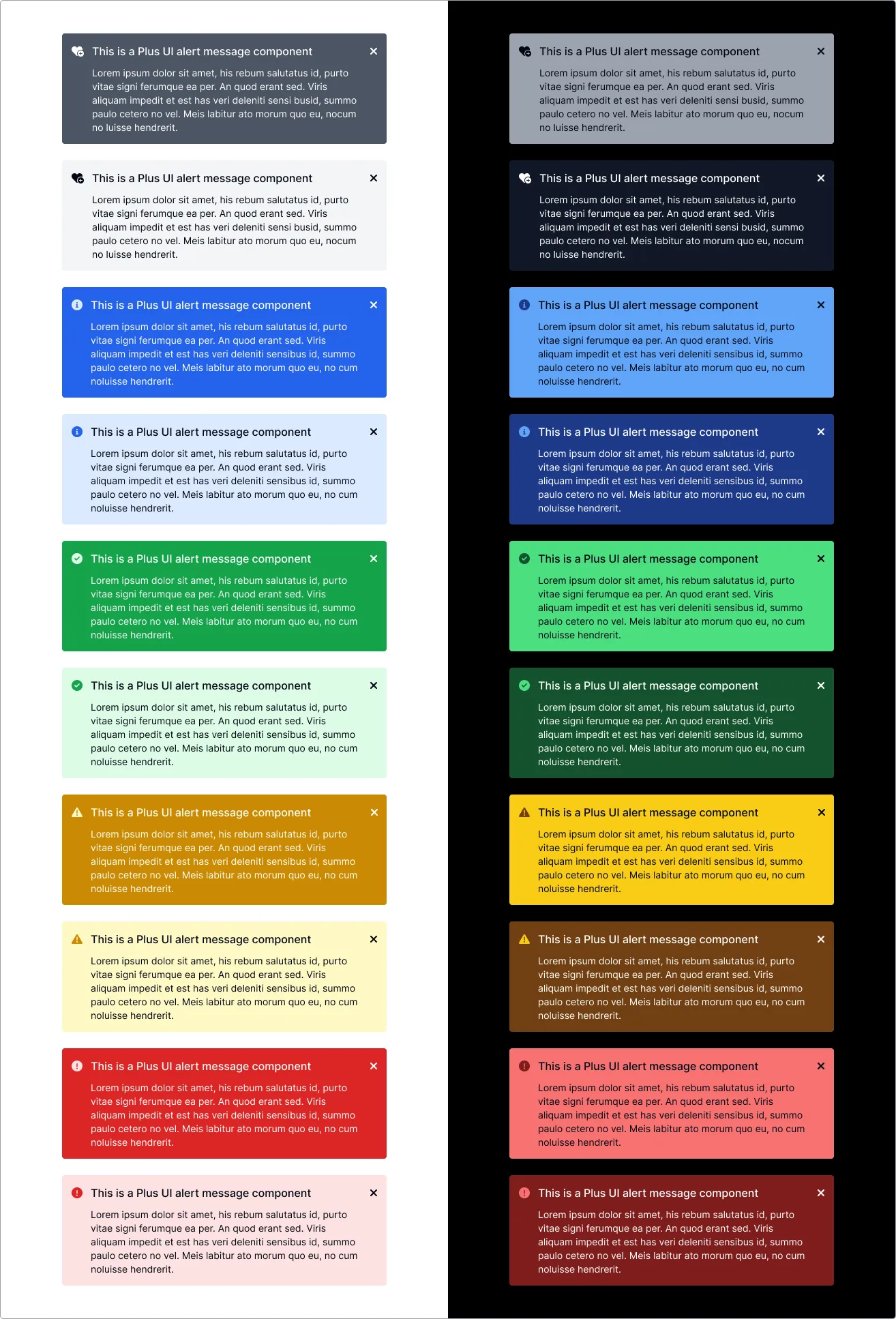
Accessibility (a11y)
Section titled “Accessibility (a11y)”- Keyboard Behavior:
- If the alert is
dismissible, the close button is focusable and can be activated usingEnterorSpace.
- If the alert is
- Screen Reader:
- The component uses
role="alert"to announce its presence and content automatically to screen reader users. aria-live="polite"ensures that updates are announced without interrupting the user, though critical alerts might warrantaria-live="assertive"if implemented via JavaScript.- The dismiss button should have an appropriate
aria-label(e.g., “Close alert”).
- The component uses
- Required Developer Actions:
- Ensure the content provided in the
messageanddescriptionslots is clear and concise. - If using custom icons via the
prefixslot, ensure they have appropriate alternative text or are marked as decorative (aria-hidden="true") if the status prop already conveys the meaning.
- Ensure the content provided in the
API Reference
Section titled “API Reference”Properties
Section titled “Properties”| Name | Type | Default | Description | Required |
|---|---|---|---|---|
kind | `‘filled' | 'outlined' | 'dashed’` | 'filled' |
size | `‘sm' | 'md' | 'lg’` | 'md' |
status | `‘default' | 'success' | 'warning' | 'danger' |
invert | boolean | false | Use inverted color scheme. | No |
dismissible | boolean | true | Show dismiss button. | No |
message | string | '' | Main message content (can also be provided via slot). | No |
description | string | '' | Additional description (can also be provided via slot). | No |
statusIcon | string | undefined | Name of the SVG icon to use for status (overrides default). | No |
dismissIcon | string | undefined | Name of the SVG icon to use for the dismiss button (overrides default). | No |
fullWidth | boolean | false | Make the alert span the full width of its container. | No |
Events
Section titled “Events”| Name | Payload Type | Description |
|---|---|---|
plus-dismiss | CustomEvent<{ status: string }> | Fired when the alert is dismissed. |
| Name | Description |
|---|---|
message | The main message content. |
description | Additional descriptive content. |
prefix | Custom status icon content. |
dismiss | Custom dismiss button content. |
CSS Shadow Parts
Section titled “CSS Shadow Parts”| Part | Description |
|---|---|
base | The main container element. |
status-icon | The status icon container. |
content | The content container. |
message | The message container. |
description | The description container. |
dismiss | The dismiss button container. |
Join the Community
Plus UI is built by the community. Join us on our platforms to contribute, get help, and stay up to date.