


Button
Button component allows users to take actions variants.
First release: 1.0.0 Latest update: July 1, 2025 Current version: 1.0.0
Import
import { PlusButton } from '@plusui/react';import { PlusButtonComponent } from '@plusui/angular';import { PlusButton } from '@plusui/vue';import PlusButton from '@plusui/svelte';<script src="https://cdn.jsdelivr.net/npm/@plusui/core"></script>Package
@plusui/react@plusui/angular@plusui/vue@plusui/svelte@plusui/coreDocs
Changelog
Button Changelog
Recent changes and updates for the button component
v1.0.0
Fixed the `full-width` prop not working correctly.
- Adjusted host element CSS (`display: inline-block`) that was preventing the component from expanding to full width.
- This change is part of the "Form System Critical Fixes" EPIC (#72).
Added Button component with multiple variants
- 4 visual styles: filled, outlined, dashed, text
- 6 status variants: default, primary, success, warning, danger, info
- 3 sizes: sm, md, lg
- Loading state with spinner
- Full-width support
- Form integration with proper ARIA attributes
The Button component enables users to perform actions and make choices with a single tap. It’s a fundamental interactive element that can render as either a <button> for actions or an <a> for navigation when an href is provided.
Anatomy
Section titled “Anatomy”
Basic Example
Section titled “Basic Example”A standard button using default settings.
Button
import { PlusButton } from '@plusui/react';
export default () => {  return (    <>      <PlusButton kind="filled" size="md" status="default">        <p>          Button        </p>      </PlusButton>    </>  );};
import { Component } from '@angular/core';
@Component({ selector: 'app-example', template: ` <plus-button kind="filled" size="md" status="default"> <p> Button </p> </plus-button> `})export class ExampleComponent {}<template> <plus-button kind="filled" size="md" status="default"> <p> Button </p> </plus-button></template><plus-button kind="filled" size="md" status="default"> <p> Button </p></plus-button><plus-button kind="filled" size="md" status="default"> <p> Button </p></plus-button>The kind prop defines the button’s visual style.
Button
Button
Button
Button
import { PlusButton } from '@plusui/react';
export default () => {  return (    <>      <PlusButton kind="filled">        <p>          Button        </p>      </PlusButton>      <PlusButton kind="outlined">        <p>          Button        </p>      </PlusButton>      <PlusButton kind="dashed">        <p>          Button        </p>      </PlusButton>      <PlusButton kind="text">        <p>          Button        </p>      </PlusButton>    </>  );};
import { Component } from '@angular/core';
@Component({ selector: 'app-example', template: ` <plus-button kind="filled"> <p> Button </p> </plus-button> <plus-button kind="outlined"> <p> Button </p> </plus-button> <plus-button kind="dashed"> <p> Button </p> </plus-button> <plus-button kind="text"> <p> Button </p> </plus-button> `})export class ExampleComponent {}<template> <plus-button kind="filled"> <p> Button </p> </plus-button> <plus-button kind="outlined"> <p> Button </p> </plus-button> <plus-button kind="dashed"> <p> Button </p> </plus-button> <plus-button kind="text"> <p> Button </p> </plus-button></template><plus-button kind="filled"> <p> Button </p></plus-button><plus-button kind="outlined"> <p> Button </p></plus-button><plus-button kind="dashed"> <p> Button </p></plus-button><plus-button kind="text"> <p> Button </p></plus-button><plus-button kind="filled"> <p> Button </p></plus-button><plus-button kind="outlined"> <p> Button </p></plus-button><plus-button kind="dashed"> <p> Button </p></plus-button><plus-button kind="text"> <p> Button </p></plus-button>Status
Section titled “Status”The status prop sets the button’s color scheme to convey semantic meaning.
Button
Button
Button
Button
Button
Button
import { PlusButton } from '@plusui/react';
export default () => {  return (    <>      <PlusButton status="default">        <p>          Button        </p>      </PlusButton>      <PlusButton status="primary">        <p>          Button        </p>      </PlusButton>      <PlusButton status="success">        <p>          Button        </p>      </PlusButton>      <PlusButton status="warning">        <p>          Button        </p>      </PlusButton>      <PlusButton status="danger">        <p>          Button        </p>      </PlusButton>      <PlusButton status="info">        <p>          Button        </p>      </PlusButton>    </>  );};
import { Component } from '@angular/core';
@Component({ selector: 'app-example', template: ` <plus-button status="default"> <p> Button </p> </plus-button> <plus-button status="primary"> <p> Button </p> </plus-button> <plus-button status="success"> <p> Button </p> </plus-button> <plus-button status="warning"> <p> Button </p> </plus-button> <plus-button status="danger"> <p> Button </p> </plus-button> <plus-button status="info"> <p> Button </p> </plus-button> `})export class ExampleComponent {}<template> <plus-button status="default"> <p> Button </p> </plus-button> <plus-button status="primary"> <p> Button </p> </plus-button> <plus-button status="success"> <p> Button </p> </plus-button> <plus-button status="warning"> <p> Button </p> </plus-button> <plus-button status="danger"> <p> Button </p> </plus-button> <plus-button status="info"> <p> Button </p> </plus-button></template><plus-button status="default"> <p> Button </p></plus-button><plus-button status="primary"> <p> Button </p></plus-button><plus-button status="success"> <p> Button </p></plus-button><plus-button status="warning"> <p> Button </p></plus-button><plus-button status="danger"> <p> Button </p></plus-button><plus-button status="info"> <p> Button </p></plus-button><plus-button status="default"> <p> Button </p></plus-button><plus-button status="primary"> <p> Button </p></plus-button><plus-button status="success"> <p> Button </p></plus-button><plus-button status="warning"> <p> Button </p></plus-button><plus-button status="danger"> <p> Button </p></plus-button><plus-button status="info"> <p> Button </p></plus-button>The size prop controls the button’s dimensions.
import { PlusButton } from '@plusui/react';
export default () => {  return (    <>      <PlusButton size="sm">        Button      </PlusButton>      <PlusButton size="md">        Button      </PlusButton>      <PlusButton size="lg">        Button      </PlusButton>    </>  );};
import { Component } from '@angular/core';
@Component({ selector: 'app-example', template: ` <plus-button size="sm"> Button </plus-button> <plus-button size="md"> Button </plus-button> <plus-button size="lg"> Button </plus-button> `})export class ExampleComponent {}<template> <plus-button size="sm"> Button </plus-button> <plus-button size="md"> Button </plus-button> <plus-button size="lg"> Button </plus-button></template><plus-button size="sm"> Button</plus-button><plus-button size="md"> Button</plus-button><plus-button size="lg"> Button</plus-button><plus-button size="sm"> Button</plus-button><plus-button size="md"> Button</plus-button><plus-button size="lg"> Button</plus-button>Disabled State
Section titled “Disabled State”Set the disabled attribute or prop to prevent user interaction.
Disabled Outlined
Disabled Text
import { PlusButton } from '@plusui/react';
export default () => {  return (    <>      <PlusButton disabled>        Disabled Filled      </PlusButton>      <PlusButton kind="outlined" disabled>        <p>          Disabled Outlined        </p>      </PlusButton>      <PlusButton kind="text" disabled>        <p>          Disabled Text        </p>      </PlusButton>    </>  );};
import { Component } from '@angular/core';
@Component({ selector: 'app-example', template: ` <plus-button disabled> Disabled Filled </plus-button> <plus-button kind="outlined" disabled> <p> Disabled Outlined </p> </plus-button> <plus-button kind="text" disabled> <p> Disabled Text </p> </plus-button> `})export class ExampleComponent {}<template> <plus-button disabled> Disabled Filled </plus-button> <plus-button kind="outlined" disabled> <p> Disabled Outlined </p> </plus-button> <plus-button kind="text" disabled> <p> Disabled Text </p> </plus-button></template><plus-button disabled> Disabled Filled</plus-button><plus-button kind="outlined" disabled> <p> Disabled Outlined </p></plus-button><plus-button kind="text" disabled> <p> Disabled Text </p></plus-button><plus-button disabled> Disabled Filled</plus-button><plus-button kind="outlined" disabled> <p> Disabled Outlined </p></plus-button><plus-button kind="text" disabled> <p> Disabled Text </p></plus-button>Loading State
Section titled “Loading State”Set the loading attribute or prop to indicate an ongoing background process. This also disables the button.
Loading Outlined
Loading Text
import { PlusButton } from '@plusui/react';
export default () => {  return (    <>      <PlusButton loading="true">        Loading Filled      </PlusButton>      <PlusButton kind="outlined" loading="true">        <p>          Loading Outlined        </p>      </PlusButton>      <PlusButton kind="text" loading="true">        <p>          Loading Text        </p>      </PlusButton>    </>  );};
import { Component } from '@angular/core';
@Component({ selector: 'app-example', template: ` <plus-button loading="true"> Loading Filled </plus-button> <plus-button kind="outlined" loading="true"> <p> Loading Outlined </p> </plus-button> <plus-button kind="text" loading="true"> <p> Loading Text </p> </plus-button> `})export class ExampleComponent {}<template> <plus-button loading="true"> Loading Filled </plus-button> <plus-button kind="outlined" loading="true"> <p> Loading Outlined </p> </plus-button> <plus-button kind="text" loading="true"> <p> Loading Text </p> </plus-button></template><plus-button loading="true"> Loading Filled</plus-button><plus-button kind="outlined" loading="true"> <p> Loading Outlined </p></plus-button><plus-button kind="text" loading="true"> <p> Loading Text </p></plus-button><plus-button loading="true"> Loading Filled</plus-button><plus-button kind="outlined" loading="true"> <p> Loading Outlined </p></plus-button><plus-button kind="text" loading="true"> <p> Loading Text </p></plus-button>Full Width
Section titled “Full Width”Set the full-width attribute or fullWidth prop to make the button span the full width of its container.
import { PlusButton } from '@plusui/react';
export default () => {  return (    <>      <PlusButton fullWidth="true">        Full Width Button      </PlusButton>    </>  );};
import { Component } from '@angular/core';
@Component({ selector: 'app-example', template: ` <plus-button full-width="true"> Full Width Button </plus-button> `})export class ExampleComponent {}<template> <plus-button full-width="true"> Full Width Button </plus-button></template><plus-button full-width="true"> Full Width Button</plus-button><plus-button full-width="true"> Full Width Button</plus-button>With Icons
Section titled “With Icons”Use the prefix and suffix slots to add icons or other elements alongside the button text.
Download
Upload
Settings
import { PlusButton } from '@plusui/react';
export default () => {  return (    <>      <PlusButton>        <i className="fa-solid fa-download" slot="prefix">        </i>        <p>          Download        </p>      </PlusButton>      <PlusButton>        <p>          Upload        </p>        <i className="fa-solid fa-upload" slot="suffix">        </i>      </PlusButton>      <PlusButton>        <i className="fa-solid fa-cog" slot="prefix">        </i>        <p>          Settings        </p>        <i className="fa-solid fa-chevron-down" slot="suffix">        </i>      </PlusButton>      <PlusButton ariaLabel="Search">        <i className="fa-solid fa-search">        </i>      </PlusButton>    </>  );};
import { Component } from '@angular/core';
@Component({ selector: 'app-example', template: ` <plus-button> <i class="fa-solid fa-download" slot="prefix"> </i> <p> Download </p> </plus-button> <plus-button> <p> Upload </p> <i class="fa-solid fa-upload" slot="suffix"> </i> </plus-button> <plus-button> <i class="fa-solid fa-cog" slot="prefix"> </i> <p> Settings </p> <i class="fa-solid fa-chevron-down" slot="suffix"> </i> </plus-button> <plus-button aria-label="Search"> <i class="fa-solid fa-search"> </i> </plus-button> `})export class ExampleComponent {}<template> <plus-button> <i class="fa-solid fa-download" slot="prefix"> </i> <p> Download </p> </plus-button> <plus-button> <p> Upload </p> <i class="fa-solid fa-upload" slot="suffix"> </i> </plus-button> <plus-button> <i class="fa-solid fa-cog" slot="prefix"> </i> <p> Settings </p> <i class="fa-solid fa-chevron-down" slot="suffix"> </i> </plus-button> <plus-button aria-label="Search"> <i class="fa-solid fa-search"> </i> </plus-button></template><plus-button> <i class="fa-solid fa-download" slot="prefix"> </i> <p> Download </p></plus-button><plus-button> <p> Upload </p> <i class="fa-solid fa-upload" slot="suffix"> </i></plus-button><plus-button> <i class="fa-solid fa-cog" slot="prefix"> </i> <p> Settings </p> <i class="fa-solid fa-chevron-down" slot="suffix"> </i></plus-button><plus-button aria-label="Search"> <i class="fa-solid fa-search"> </i></plus-button><plus-button> <i class="fa-solid fa-download" slot="prefix"> </i> <p> Download </p></plus-button><plus-button> <p> Upload </p> <i class="fa-solid fa-upload" slot="suffix"> </i></plus-button><plus-button> <i class="fa-solid fa-cog" slot="prefix"> </i> <p> Settings </p> <i class="fa-solid fa-chevron-down" slot="suffix"> </i></plus-button><plus-button aria-label="Search"> <i class="fa-solid fa-search"> </i></plus-button>As Links
Section titled “As Links”When an href is provided, the button renders as an anchor element while maintaining button styling.
Dashboard
Profile
GitHub
import { PlusButton } from '@plusui/react';
export default () => {  return (    <>      <PlusButton href="/dashboard" kind="filled" status="primary">        <p>          Dashboard        </p>      </PlusButton>      <PlusButton href="/profile" kind="outlined">        <p>          Profile        </p>      </PlusButton>      <PlusButton href="https://github.com" external="true" kind="text">        <p>          GitHub        </p>      </PlusButton>    </>  );};
import { Component } from '@angular/core';
@Component({ selector: 'app-example', template: ` <plus-button href="/dashboard" kind="filled" status="primary"> <p> Dashboard </p> </plus-button> <plus-button href="/profile" kind="outlined"> <p> Profile </p> </plus-button> <plus-button href="https://github.com" external="true" kind="text"> <p> GitHub </p> </plus-button> `})export class ExampleComponent {}<template> <plus-button href="/dashboard" kind="filled" status="primary"> <p> Dashboard </p> </plus-button> <plus-button href="/profile" kind="outlined"> <p> Profile </p> </plus-button> <plus-button href="https://github.com" external="true" kind="text"> <p> GitHub </p> </plus-button></template><plus-button href="/dashboard" kind="filled" status="primary"> <p> Dashboard </p></plus-button><plus-button href="/profile" kind="outlined"> <p> Profile </p></plus-button><plus-button href="https://github.com" external="true" kind="text"> <p> GitHub </p></plus-button><plus-button href="/dashboard" kind="filled" status="primary"> <p> Dashboard </p></plus-button><plus-button href="/profile" kind="outlined"> <p> Profile </p></plus-button><plus-button href="https://github.com" external="true" kind="text"> <p> GitHub </p></plus-button>External Links
Section titled “External Links”Use the external prop for external links that should open in a new tab with secure attributes.
GitHub
import { PlusButton } from '@plusui/react';
export default () => {  return (    <>      <PlusButton href="https://github.com" external="true" kind="filled">        <p>          GitHub        </p>      </PlusButton>      <PlusButton href="https://google.com" external="true" kind="outlined">        <p>          Google        </p>      </PlusButton>    </>  );};
import { Component } from '@angular/core';
@Component({ selector: 'app-example', template: ` <plus-button href="https://github.com" external="true" kind="filled"> <p> GitHub </p> </plus-button> <plus-button href="https://google.com" external="true" kind="outlined"> <p> Google </p> </plus-button> `})export class ExampleComponent {}<template> <plus-button href="https://github.com" external="true" kind="filled"> <p> GitHub </p> </plus-button> <plus-button href="https://google.com" external="true" kind="outlined"> <p> Google </p> </plus-button></template><plus-button href="https://github.com" external="true" kind="filled"> <p> GitHub </p></plus-button><plus-button href="https://google.com" external="true" kind="outlined"> <p> Google </p></plus-button><plus-button href="https://github.com" external="true" kind="filled"> <p> GitHub </p></plus-button><plus-button href="https://google.com" external="true" kind="outlined"> <p> Google </p></plus-button>Download Links
Section titled “Download Links”Use the download prop to create download links.
Download PDF
Download Image
import { PlusButton } from '@plusui/react';
export default () => {  return (    <>      <PlusButton href="/files/document.pdf" download kind="filled">        <i className="fa-solid fa-download" slot="prefix">        </i>        <p>          Download PDF        </p>      </PlusButton>      <PlusButton href="/files/image.jpg" download="my-image.jpg" kind="outlined">        <i className="fa-solid fa-image" slot="prefix">        </i>        <p>          Download Image        </p>      </PlusButton>    </>  );};
import { Component } from '@angular/core';
@Component({ selector: 'app-example', template: ` <plus-button href="/files/document.pdf" download kind="filled"> <i class="fa-solid fa-download" slot="prefix"> </i> <p> Download PDF </p> </plus-button> <plus-button href="/files/image.jpg" download="my-image.jpg" kind="outlined"> <i class="fa-solid fa-image" slot="prefix"> </i> <p> Download Image </p> </plus-button> `})export class ExampleComponent {}<template> <plus-button href="/files/document.pdf" download kind="filled"> <i class="fa-solid fa-download" slot="prefix"> </i> <p> Download PDF </p> </plus-button> <plus-button href="/files/image.jpg" download="my-image.jpg" kind="outlined"> <i class="fa-solid fa-image" slot="prefix"> </i> <p> Download Image </p> </plus-button></template><plus-button href="/files/document.pdf" download kind="filled"> <i class="fa-solid fa-download" slot="prefix"> </i> <p> Download PDF </p></plus-button><plus-button href="/files/image.jpg" download="my-image.jpg" kind="outlined"> <i class="fa-solid fa-image" slot="prefix"> </i> <p> Download Image </p></plus-button><plus-button href="/files/document.pdf" download kind="filled"> <i class="fa-solid fa-download" slot="prefix"> </i> <p> Download PDF </p></plus-button><plus-button href="/files/image.jpg" download="my-image.jpg" kind="outlined"> <i class="fa-solid fa-image" slot="prefix"> </i> <p> Download Image </p></plus-button>Form Integration
Section titled “Form Integration”Use the type prop to specify button behavior in forms.
Submit
Reset
Cancel
import { PlusButton } from '@plusui/react';
export default () => {  return (    <>      <PlusButton type="submit" kind="filled" status="primary">        <p>          Submit        </p>      </PlusButton>      <PlusButton type="reset" kind="outlined" status="warning">        <p>          Reset        </p>      </PlusButton>      <PlusButton type="button" kind="text">        <p>          Cancel        </p>      </PlusButton>    </>  );};
import { Component } from '@angular/core';
@Component({ selector: 'app-example', template: ` <plus-button type="submit" kind="filled" status="primary"> <p> Submit </p> </plus-button> <plus-button type="reset" kind="outlined" status="warning"> <p> Reset </p> </plus-button> <plus-button type="button" kind="text"> <p> Cancel </p> </plus-button> `})export class ExampleComponent {}<template> <plus-button type="submit" kind="filled" status="primary"> <p> Submit </p> </plus-button> <plus-button type="reset" kind="outlined" status="warning"> <p> Reset </p> </plus-button> <plus-button type="button" kind="text"> <p> Cancel </p> </plus-button></template><plus-button type="submit" kind="filled" status="primary"> <p> Submit </p></plus-button><plus-button type="reset" kind="outlined" status="warning"> <p> Reset </p></plus-button><plus-button type="button" kind="text"> <p> Cancel </p></plus-button><plus-button type="submit" kind="filled" status="primary"> <p> Submit </p></plus-button><plus-button type="reset" kind="outlined" status="warning"> <p> Reset </p></plus-button><plus-button type="button" kind="text"> <p> Cancel </p></plus-button>Handling Clicks
Section titled “Handling Clicks”Listen for the plus-click event to trigger actions when the button is clicked.
import { PlusButton } from '@plusui/react';
export default () => {  const handleClick = () => {    console.log('Button clicked');  };
  return (    <PlusButton onClick={handleClick}>      Click Me    </PlusButton>  );};
import { Component } from '@angular/core';
@Component({ selector: 'app-example', template: ` <plus-button (plus-click)="handleClick()">Click Me</plus-button> `})export class ExampleComponent { handleClick() { console.log('Button clicked'); }}<template> <plus-button @plus-click="handleClick">Click Me</plus-button></template>
<script>export default { methods: { handleClick() { console.log('Button clicked'); } }};</script><script> function handleClick() { console.log('Button clicked'); }</script>
<plus-button on:plus-click={handleClick}>Click Me</plus-button><plus-button id="my-button">Click Me</plus-button>
<script> const button = document.getElementById('my-button'); button.addEventListener('plus-click', () => { console.log('Button clicked'); });</script>Visual Sections
Section titled “Visual Sections”Layout & Spacing
Section titled “Layout & Spacing”
Light & Dark Mode
Section titled “Light & Dark Mode”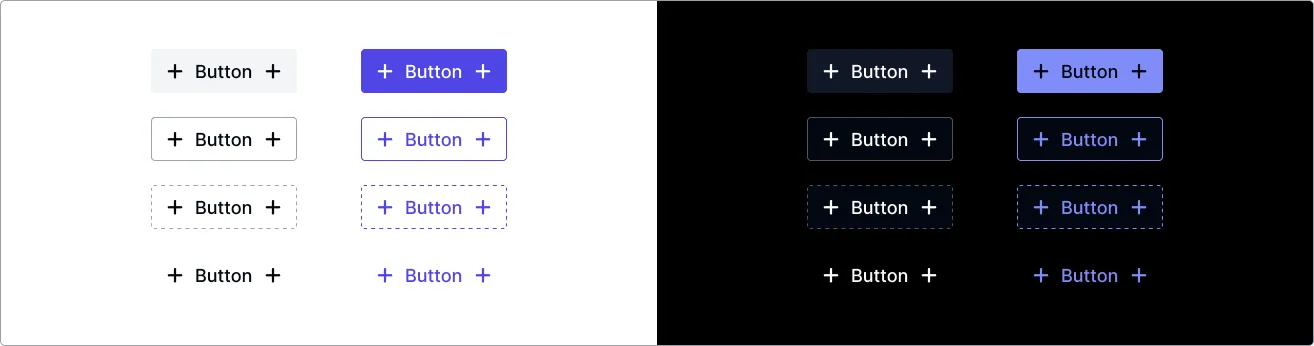
Accessibility (a11y)
Section titled “Accessibility (a11y)”- Keyboard Behavior:
- Buttons and links are focusable via the
Tabkey. - Can be activated using
EnterorSpacekeys when focused. - Links support
Enterkey activation, buttons support bothEnterandSpace.
- Buttons and links are focusable via the
- Screen Reader:
- When no
hrefis provided, uses the native<button>element with implicitrole="button". - When
hrefis provided, uses the native<a>element with appropriate link semantics. - The text content provided within the component serves as the accessible name.
- For icon-only buttons/links, provide a descriptive
aria-labelattribute.
- When no
- Required Developer Actions:
- Use
hreffor navigation, omit it for actions. - Ensure button/link text clearly indicates the action or destination.
- For icon-only components, always provide an
aria-labelattribute (e.g.,<plus-button href="/settings" aria-label="Settings"><i class="fas fa-cog"></i></plus-button>). - Ensure sufficient color contrast between the text/icon and background.
- Use
externalprop for external links to automatically add secure attributes.
- Use
Design System
Section titled “Design System”API Reference
Section titled “API Reference”Properties
Section titled “Properties”| Name | Type | Default | Description | Required |
|---|---|---|---|---|
kind | 'filled' | 'outlined' | 'dashed' | 'text' | 'filled' | Visual style of the button. | No |
status | 'default' | 'primary' | 'success' | 'warning' | 'danger' | 'info' | 'default' | Status/color variant of the button. | No |
size | 'sm' | 'md' | 'lg' | 'md' | Size of the button. | No |
disabled | boolean | false | Disables button interaction. | No |
loading | boolean | false | Shows loading spinner and disables interaction. | No |
fullWidth | boolean | false | Makes the button span the full width. | No |
href | string | undefined | When provided, renders as anchor link instead of button. | No |
target | string | undefined | Specifies where to display the linked URL. | No |
rel | string | undefined | Relationship between current and linked document. | No |
download | string | undefined | Sets link to download instead of navigate. | No |
external | boolean | false | Automatically sets secure attributes for external links. | No |
type | 'button' | 'submit' | 'reset' | 'button' | Button type for form interactions (button only). | No |
Events
Section titled “Events”| Name | Payload Type | Description |
|---|---|---|
plus-click | CustomEvent<void> | Fired when the button is clicked. |
plus-focus | CustomEvent<void> | Fired when the button receives focus. |
plus-blur | CustomEvent<void> | Fired when the button loses focus. |
| Name | Description |
|---|---|
default (unnamed) | The main content of the button (text, etc.). |
prefix | Content placed before the default slot content. |
suffix | Content placed after the default slot content. |
CSS Custom Properties
Section titled “CSS Custom Properties”| Name | Description |
|---|---|
--text-color | Controls the text color. |
--border-color | Controls the border color. |
--bg-default | Controls the default background color. |
--bg-hovered | Controls the background on hover. |
--bg-pressed | Controls the background when pressed. |
--bg-focused | Controls the background when focused. |
--bg-loading | Controls the background when loading. |
CSS Shadow Parts
Section titled “CSS Shadow Parts”| Part | Description |
|---|---|
button | The main button container. |
Join the Community
Plus UI is built by the community. Join us on our platforms to contribute, get help, and stay up to date.